






version 2.1.3 - Download ZIP file
version 2.1.0 - Download ZIP file
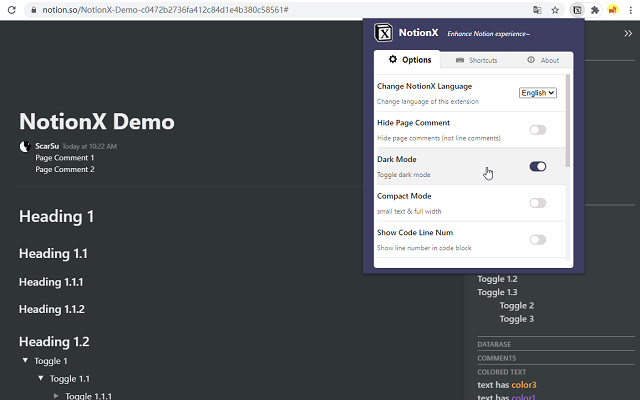
NotionX is building for enhancing experience of Notion(notion.so) Web App, and try to keep it consistent with the cute native application UI style.
NotionX offers the following features:
√ Dynamic Table of Content SideBar
√ Page Content statistics
√ Set All Code Block Language
√ Open current page in Notion desktop
√ Generate index for Header blocks
√ Enable/Disable button for NotionX
√ SideBar modules can be closed and restored
√ Hide Table block's 'New' button
√ Add ukrainian locale
√ Add a "scroll to top button" in the bottom right corner of the page
√ Show line numbers in code blocks
√ Low Contrast Dark Mode
√ Notion Shortcuts Quick Reference Manual
√ Support Multiple languages
√ Hide comments at the top of the page
√ Switching Notion dark mode
√ Compact Mode:full width + small text
√ Prevent table overflow
√ More Features on the way
Q: How to enable NotionX?
A: Install this extension ,open any address hosted as 'notion.so', and you will find buttons on the right hand side of the page header; The NotionX pop-up page can be found by clicking on the NotionX plugin icon on the right side of your browser address bar.
Want more features? suggest here: https://github.com/scarsu/NotionX/discussions/4
NotionX Homepage:
http://www.scarsu.cn/notionx/
Source Code:
https://github.com/scarsu/NotionX
This is a free and open-source browser extension. If you rating ★★★★★ I will devote more time to improving it, thanks~~~
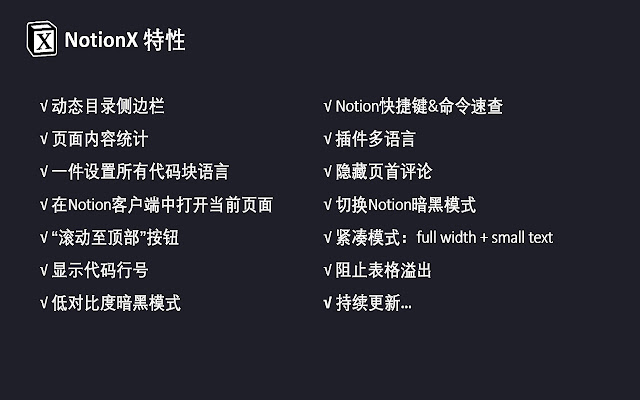
NotionX是为了提升Notion(notion.so)Web App的体验而构建的,并尽量保持与可爱的原生应用UI风格一致。
在v2.1.0版本中,NotionX提供了以下功能。
√ 动态目录侧边栏
√ 页面内容统计
√ 一件设置所有代码块语言
√ 在Notion客户端中打开当前页面
√ 为Header生成序号
√ 插件启用/禁用按钮NotionX
√ SideBar模块可以关闭/恢复
√ 隐藏Table的'New'按钮
√ ukrainian语言
√ “滚动至顶部”按钮
√ 显示代码行号
√ 低对比度暗黑模式
√ Notion快捷键&命令速查
√ 插件多语言
√ 隐藏页首评论
√ 切换Notion暗黑模式
√ 紧凑模式:full width + small text
√ 阻止表格溢出
√ 持续更新…
问:如何启用NotionX?
答:安装这个扩展,打开任何一个主机为 "notion.so"的网址,你会找到位于页面头部右侧的按钮;在浏览器地址栏右侧点击NotionX插件图标,可以找到NotionX的弹出页面。
想要更多的功能,请在这里建议:https://github.com/scarsu/NotionX/discussions/4
NotionX 首页:
http://www.scarsu.cn/notionx/
源代码:
https://github.com/scarsu/NotionX
这是一个免费开源的浏览器扩展。如果你能评价五颗星★★★★★,我会投入更多的时间去完善它,3qqqqq~~~。
Extore is a team of professionals who are passionate about creating extensions for web browsers. This devotion also gives us opportunity to appreciate work of other people. We get inspired by useful, open source extensions made by developers all over the world. Our strong belief is that one should share helpful add-ons with others. That’s why we’d like to present you our ever-growing list of favourite extensions that have inspired us. Moreover, as you probably have already learned, sometimes struggling for the best brings an end to the good. Talking about add-ons it often turns out that an upgrade is worse then previous version. Also it can become really tricky to get back to the beloved version of your favourite extension. That’s why we’re going to make not only the latest, but all versions of our favourite (and we hope yours too) add-ons available for download. No more compromises, just stick to the version you really like!
 Preparing download link, please wait for seconds
Almost done...
Click to download
Error getting file. Please try again
Preparing download link, please wait for seconds
Almost done...
Click to download
Error getting file. Please try again







