

version 2.1.1.0 - Download ZIP file
version 2.1.0.0 - Download ZIP file
version 2.0.0.0 - Download ZIP file
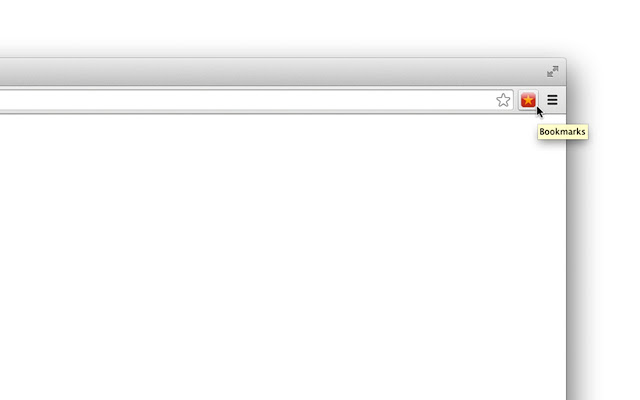
This is just a shortcut to the bookmarks, nothing more.
When installed, it will add "Bookmarks" icon to your browser's toolbar.
Click the icon and you'll open Chrome bookmarks manager.
And that's all this "extension" does...
(There are some options available -- you can set the button to open the bookmarks page in new tab or in the current tab and, if you want, you can add it to the context menu.)
**Questions & Answers**
Why adding separate extension to access bookmarks when it’s accessible with two clicks from the menu?
-- Because with the bookmarks button in the toolbar you’ll do it in one click, which is 50% faster :)
But extensions eat system memory, why wasting resources just for quick shortcut to the bookmarks?
-- The bookmarks button doesn’t “eat” memory. In technical terms, it uses non-persistent background page, which means chrome doesn’t need to reserve memory for the bookmarks extension (check the Chrome Task Manager if you don’t trust us -- when you click on the bookmarks icon it will start the extension, open the bookmarks page and release the memory right after that)
Why not just use a bookmark to the bookmarks page instead of installing separate extension?
-- You could, but you’ll need more clicks to access the bookmarks bookmark from the menu or you’ll need to have the bookmarks bar open. For people like me the bookmarks bar is not a good choice (it takes from the vertical space of the browser) and one small bookmarks button in the toolbar is more convinient.
If I install the bookmarks button, is it easy to remove the extension later?
-- Yes, you can remove it with literally two clicks (just right-click on the bookmarks button and select “Remove from Chrome”)
How to find the bookmarks button options?
-- Right-click on the bookmarks icon and select “Options”.
How to open the bookmarks page in the current tab instead of opening new tab?
-- Right-click on the bookmarks button and select “Options”, then uncheck the first checkbox
How to add shortcut to bookmarks to the context menu?
-- Go to the options page (see above) and check the respective checkbox (“Add bookmarks button to context menu”)
How to change the bookmarks icon?
-- Currently you can’t, but in the next version (coming soon) we’ll add this functionality
Is it possible to add the bookmarks button to chrome apps page?
-- Currently you can, but in future it will be possible only on Chrome OS devices. To do that just install our Bookmarks Button app (copy the link below and paste it in new tab):
https://chrome.google.com/webstore/detail/bookmarks/jplkngkapeddgiikfniiladdganlikof
Do you have more shortcuts like Bookmarks Button?
-- Definitely, see www.sinigleclickapps.com
**Bookmarks Button -- Version Bookmarks**
ver.2.0 – Added options (context menu support), minor fixes
ver.1.0 – Initial Release
**More toolbar shortcuts**
(These are like this bookmarks button, but for different Chrome pages)
Settings Button:
https://chrome.google.com/webstore/detail/settings-button/djnjlcddkkokbiegdiackidkeekmgdce
Downloads Button:
https://chrome.google.com/webstore/detail/downloads/kmeimggcacadlbnpfccpndimcapidlcl
Shortcut to History:
https://chrome.google.com/webstore/detail/history-button/kakmedkloohedkbmmgchndgichbdndng
Extensions:
https://chrome.google.com/webstore/detail/extensions/lmjcdccmhfohhffdhmleihkcgefgnghb?utm_source=chrome-ntp-icon
Plugins:
https://chrome.google.com/webstore/detail/plugins/mmcblfncjaclajmegihojiekebofjcen
Shortcut to Chrome Apps page:
https://chrome.google.com/webstore/detail/apps-button/ccaamabfdfcoealabklkkjohkhgomhmo?utm_source=chrome-ntp-icon
**More from the bookmarks button author**
• History On/Off – disable bookmarks on the fly:
https://chrome.google.com/webstore/detail/history-onoff/ljbpakpmiimdmblcjjhhbfabbkmcgmdp
• SingleClick Cleaner – cleanup Chrome in one single click:
https://chrome.google.com/webstore/detail/singleclick-cleaner/cknijndocnnlkpenngcdcpleddlmckkm
More about the Bookmarks Button:
https://singleclickapps.com/bookmarks-button/
Extore is a team of professionals who are passionate about creating extensions for web browsers. This devotion also gives us opportunity to appreciate work of other people. We get inspired by useful, open source extensions made by developers all over the world. Our strong belief is that one should share helpful add-ons with others. That’s why we’d like to present you our ever-growing list of favourite extensions that have inspired us. Moreover, as you probably have already learned, sometimes struggling for the best brings an end to the good. Talking about add-ons it often turns out that an upgrade is worse then previous version. Also it can become really tricky to get back to the beloved version of your favourite extension. That’s why we’re going to make not only the latest, but all versions of our favourite (and we hope yours too) add-ons available for download. No more compromises, just stick to the version you really like!
 Preparing download link, please wait for seconds
Almost done...
Click to download
Error getting file. Please try again
Preparing download link, please wait for seconds
Almost done...
Click to download
Error getting file. Please try again







