

Grading Assistant is a professional time-saving tool for teachers designed to streamline the grading process by providing the ability to transfer grades quickly, accurately, and with the protection of student data privacy, all through the convenience of an easy-to-use interface within your browser.
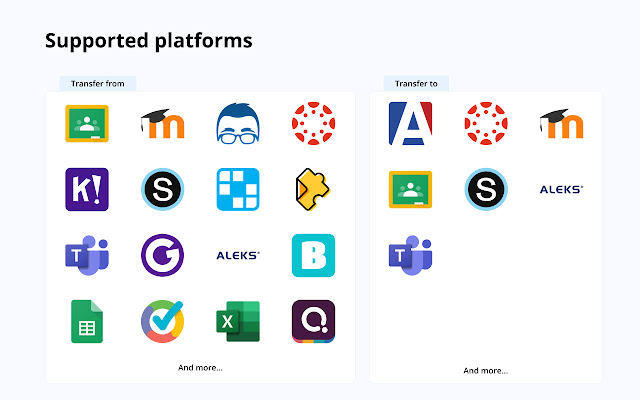
Teachers can sync grades between various platforms, like Blooket, Edpuzzle, Wordwall, Socrative and many others, to their preferred gradebook, including Google Classroom, Canvas, Schoology, Microsoft Teams, Moodle, and more.
Every educator will find education technology tool he/she already use, supported edtech platforms, and grade books listed on this page:
https://grade-assistant.com/integrations
One of the most effective ways to boost teacher productivity is using Chrome extensions, and the Grading Assistant is one of the must-have productivity grading apps for teachers in 2023. The Grading Assistant is more than just a grader or tool for transferring grades it’s a complete teacher assistant. The tool offers a range of features to effectively improve your classroom management.
Benefits
– Saving time and effort on syncing and scaling grades.
– Preventing errors and typos compared to manual copying grades.
– Protecting student data privacy compared to using third-party integrations.
– Saving money with cost-effective pricing, for the price of a single cup of coffee, enjoy hours saved each month.
Grading Assistant features:
– Auto-detection platforms supported to export grades and grade books supported to import grades.
– Auto-detection of supported grade books on school domains, including Moodle, Canvas, and Schoology.
– Copy grades from popular edtech platforms, including Google Classroom, Microsoft Teams, Blooket, Edpuzzle, Wordwall, Socrative, and more.
– Copy and paste grades into Grading Assistant from any spreadsheet software like Google Sheets or Excel.
– Grade scale to different grading systems.
– Replacements and filters in names.
– Export grades into CSV.
Grade scale feature scales student grades on the fly to:
– Percentage grading system.
– Points grading system.
– Letter grading system.
– GPA grading system.
– Your custom grading system.
Replacements and filters in transfer student names
– Save auto-replacements in names to fix typos or discrepancies.
– Remove everything starting with a letter, number, symbol, or word in each student's name.
– Remove everything up until a letter, number, symbol, or word in each student's name.
– Filter out a letter, number, symbol, or word in each student's name.
⭐️ How extension works:
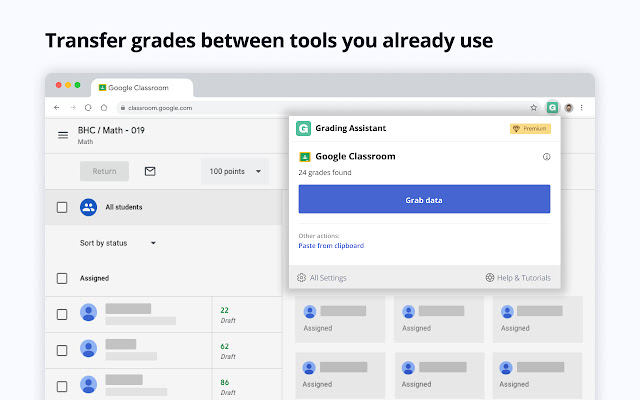
When you open the supported platform, for example, Google Classroom or Blooket, the extension icon in the chrome toolbar becomes green, which means that Grading Assistant can find student names and grades on the pages of this platform. When you click on the Grading Assistant icon, the extension tries to find student names and grades on the page, and when found at least one grade, it offers to grab data from the page by clicking the Grab data button. After data is grabbed from the page, you can scale grades, apply filters or do replacements in name, and save settings for future grade transfers. When data is ready to fill in the gradebook, you open an assignment page on the preferred gradebook, like Schoology or Canvas, and click fill data in Grading Assistant extension. The grade transferer fills in grades by matching student names from the source with your grade book. That's it. Everything happens in your browser. Student data is stored temporarily, encrypted on your browser storage, and cleared after filling.
In the same way, teachers can export grades from 30+ supported platforms and import grades to 9 supported grade books with a few clicks. Quickly, accurately and securely.
???? Privacy
We do not collect student names, grades, scaled grades, or any other student data transferred using the grade transferer feature in Grading Assistant Chrome Extension. All temporary data, grades, and student names during the transferring process are stored encrypted in your browser and are irrevocably cleared from your browser each time you click the clear button.
Permissions
Grading Assistant grade sync tool requires next permission to provide educators with a streamlined and efficient way to transfer grades:
– "activeTab" and "tabs": These permissions allow the extension to access the currently active tab and get information about the tabs in the browser. The Grading Assistant uses these to detect when a supported platform is open, such as Canvas, Schoology, Moodle, Microsoft Teams, or Google Classroom, and to export grades from assignments or import them to a grade book.
– "scripting": This permission allows the extension to inject code into a web page helps to get grades from the education technology platforms or import grades to gradebook.
– "clipboardRead": This permission allows the extension to read the clipboard's contents when pasting student grades from Google Sheets or Excel.
– "storage": This permission allows the extension to store and access data in the browser's storage. The Grading Assistant uses this permission to store temporary data, grades, and encrypted student names while transferring by the grade transferer.
– "notifications": This permission allows the extension to display notifications to the user about grader updates and supported teacher tools.
– "host_permissions" section of the manifest allows the extension to access all URLs. This permission is required for the extension to work with various edtech platforms and grade books.
In conclusion, Grading Assistant is a powerful tool that can help teachers simplify the grading process and improve their overall productivity, and it suits any platform you prefer, Canvas, Google Classroom, Microsoft Teams, or any other. Whether you're a seasoned teacher or just starting out, Grading Assistant can help you manage your classroom more effectively and ensure that your grading scale is accurate and consistent. With its powerful features and cost-effective pricing, Grading Assistant is the perfect tool for any educator looking to streamline the grading process and change it to automated grading.
Ready to save time on grade transferring? Sign up today for free – grade-assistant.com.
???? Info / Contact Us:
More information and documentation: https://grade-assistant.com
Version log: https://grade-assistant.com/changelog
Privacy policy: https://grade-assistant.com/privacy
For questions about Grading Assistant, please email us at [email protected] or reach out on Twitter: @grade_assistant.
Extore is a team of professionals who are passionate about creating extensions for web browsers. This devotion also gives us opportunity to appreciate work of other people. We get inspired by useful, open source extensions made by developers all over the world. Our strong belief is that one should share helpful add-ons with others. That’s why we’d like to present you our ever-growing list of favourite extensions that have inspired us. Moreover, as you probably have already learned, sometimes struggling for the best brings an end to the good. Talking about add-ons it often turns out that an upgrade is worse then previous version. Also it can become really tricky to get back to the beloved version of your favourite extension. That’s why we’re going to make not only the latest, but all versions of our favourite (and we hope yours too) add-ons available for download. No more compromises, just stick to the version you really like!
 Preparing download link, please wait for seconds
Almost done...
Click to download
Error getting file. Please try again
Preparing download link, please wait for seconds
Almost done...
Click to download
Error getting file. Please try again







