


From the creator of Vextend Sell for Vend POS (search Vextend in Chrome Web Store) comes a tool for easier management of back office features in Vend.
Label Printing:
• Customize label printing by adjusting the font size, position, and weight for the SKU, price, and item name.
• Replace the fuzzy Vend SKU with clear, normal text that looks professional.
• Change the width and height of barcodes on labels.
• Duplicate or remove any labels from the print screen.
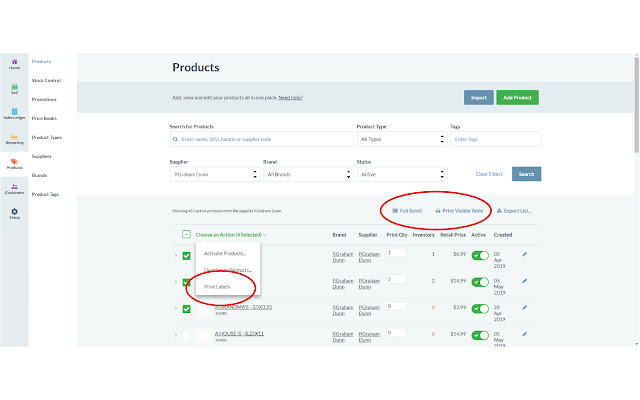
• From the Vend Products page, use the Vend check boxes to select items to print. This allows printing of multiple labels at once without needing them in a purchase order!
• From the Purchase Order views, print only the labels you want and customize the quantities you want to print.
Formatted Printing:
• Printing from the Vend Products page or purchase orders gives ugly results with weirdly formatted pages. Take control with Vextend Office printing! Added interface buttons transfer all data from the currently visible products page or from any purchase order to a special window where you can format and print a concise view of your inventory or purchase order!
• Optionally hide data columns, header details, or specific rows when printing.
• Have fields with long data? Set a max number of characters to print for each column.
Products Page:
• Vend by default only loads 25 items from search results, but more load when scrolling to the bottom of the page (lazy load). Use the added full scroll button to automatically quick scroll to load all items. Handy for using the Vextend Office Print Table Feature
• Select items to print labels for using the built in Vend check boxes.
• Print the currently visible rows using the Vextend Print Table function.
Vextend Office is free to install with no subscriptions or fees. Vextend Sell and Vextend Office are private extensions and are not created by, affiliated with, or supported by Vend POS.
Update Log:
0.1.2.3: 1/9/2020
• Fixed error with wrong price being sent from the purchase order screen for label printing.
0.1.2.2: 1/6/2020
• Added option to label printing page to bulk select labels for deletion. Changed helper key to delete single label from Ctrl to Alt (Option) for better Mac compatibility.
• Custom select which items in a purchase order you want to print labels for. You can also change the quantity of how many to print. Defaults to quantity received, but if order is not yet received defaults to number ordered. However, you can change the quantity for any item.
• Fixes: Fixed error where multiple buttons would show on Products page for Full scroll and Print Visible Table. Fixed bad header data on the Print Visible Table tool coming from the Products page. Fixed error where Custom SKUs sometimes appear to all have the same SKU number if printing from Vextend custom print lists.
Extore is a team of professionals who are passionate about creating extensions for web browsers. This devotion also gives us opportunity to appreciate work of other people. We get inspired by useful, open source extensions made by developers all over the world. Our strong belief is that one should share helpful add-ons with others. That’s why we’d like to present you our ever-growing list of favourite extensions that have inspired us. Moreover, as you probably have already learned, sometimes struggling for the best brings an end to the good. Talking about add-ons it often turns out that an upgrade is worse then previous version. Also it can become really tricky to get back to the beloved version of your favourite extension. That’s why we’re going to make not only the latest, but all versions of our favourite (and we hope yours too) add-ons available for download. No more compromises, just stick to the version you really like!
 Preparing download link, please wait for seconds
Almost done...
Click to download
Error getting file. Please try again
Preparing download link, please wait for seconds
Almost done...
Click to download
Error getting file. Please try again







