
Background
Compression is a core feature of HTTP that improves transfer speed, cache bandwidth utilization and cache utilization.
Lossless data compression algorithms development led to the LZW algorithm (1984), used by the compress application (1985), and then the PKZIP application (1991) with its DEFLATE algorithm which was then used in the gzip format (1992). The zlib library (1995) became a de facto standard compression library for gzip data.
HTTP/1.1 in 1999 (RFC 2616) added support for gzip, compress and deflate compression as content encodings. gzip compression quickly became the default as it compressed better than compress, which used the patented LZW algorithm, and as Microsoft incorrectly implemented deflate as a broken raw deflate stream instead of the correct deflate stream inside a zlib format wrapper.
Compression algorithms generally define a file format and how to decompress it. This allows the user to pick an appropriate compression level: either fast compression, which compresses quickly, but doesn't compress very small or instead best compression, which compresses slowly but generates a smaller output.
With gzip and zlib these levels range from 1 (fast) to 9 (best), with a default of 6.
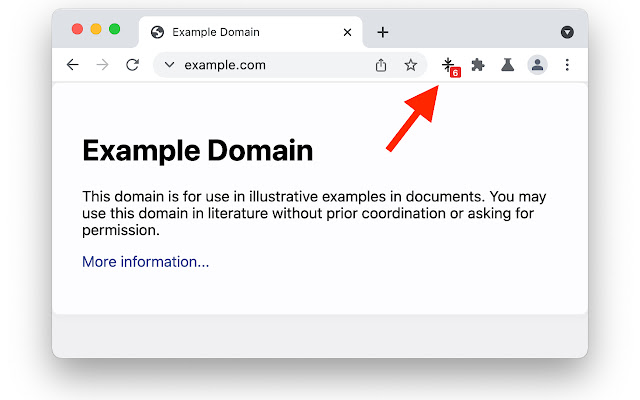
When you browse to a page with this extension and the content is compressed with gzip, a little badge is shown with the estimated compression level.
If the compression was achieved with a gzip compressor other than zlib, a fractional estimate of zlib compression level is shown.
How does it work?
The chrome extension notes the Content-Length of the page as it is loaded, then fetches the page again, tries to compress it with a variety of levels and then displays the result.
This uses more network and CPU. Use sparingly.
TODO
Some websites use the newer Brotli compression algorithm instead of gzip. This extension does not support Brotli yet.
Extore is a team of professionals who are passionate about creating extensions for web browsers. This devotion also gives us opportunity to appreciate work of other people. We get inspired by useful, open source extensions made by developers all over the world. Our strong belief is that one should share helpful add-ons with others. That’s why we’d like to present you our ever-growing list of favourite extensions that have inspired us. Moreover, as you probably have already learned, sometimes struggling for the best brings an end to the good. Talking about add-ons it often turns out that an upgrade is worse then previous version. Also it can become really tricky to get back to the beloved version of your favourite extension. That’s why we’re going to make not only the latest, but all versions of our favourite (and we hope yours too) add-ons available for download. No more compromises, just stick to the version you really like!
 Preparing download link, please wait for seconds
Almost done...
Click to download
Error getting file. Please try again
Preparing download link, please wait for seconds
Almost done...
Click to download
Error getting file. Please try again







