


version 1.4.0 - Download ZIP file
version 1.3.3 - Download ZIP file
version 1.2.5 - Download ZIP file
mCoffee
=======
This is my take on the extension Morning Coffee from Firefox, which allows you to launch bookmarks based on the day of the week. I wrote this extension for my own use, and am sharing it in case anyone finds it useful.
Instructions
==========
Please refer to https://sites.google.com/view/extension-mcoffee/home for instructions and examples on how to configure and use this extension.
A brief summary below.
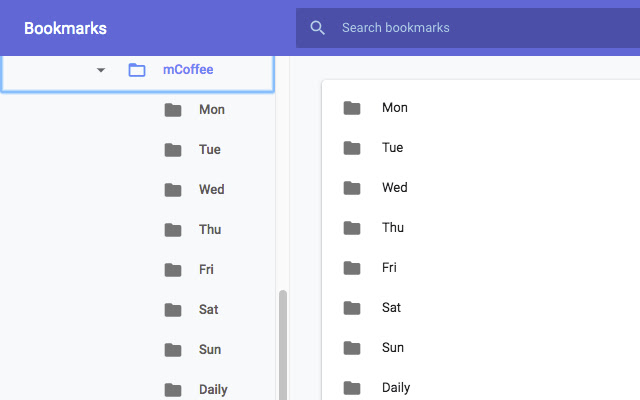
1) create a folder named "mCoffee". If you have multiple folders with the same name, It will only process the first one found.
2) Under the "mCoffee" folder, you can create the following subfolders (create only folders that you use, i.e. you don't need to create "Tue" if you don't have Tuesday specific items to launch)
i) Daily
ii) Mon / Tue / Wed / Thu / Fri / Sat / Sun
iii) 1 - 31
- place items for a specific day of the month here. For example, items in the folder "1" will be launched on the first day of the month (e.g. you want to check your bank statement every 1st day of the month).
iv) Weekday
- items that you want to launch from Mon - Fri
v) Weekend
- items that you want to launch on Sat, Sun
vi) Autostart
- items here will be launched when the extension is loaded
vii) Rules
- set conditions for launching items
- add the conditions as a comma separated list inside square brackets in the item's title, e.g. "Testing [2,Mon,Wed]" to launch the item "Testing" on the 2nd of the month, Mondays and Wednesdays
Notes
=====
This is a very basic extension, everything is managed using the bookmark manager.
The extension checks if the URL is already opened in an existing tab, if so it won't launch a duplicate tab. Note that some sites automatically expands / redirect the base url. For example, if you launched https://mail.google.com the opened url will be https://mail.google.com/mail/. If you click on the extension icon again, it will open another tab for Gmail because "https://mail.google.com" doesn't match "https://mail.google.com/mail/".
Items are opened in the following folder order; Daily, day of week and day of month. Standalone folders are processed first, followed by the Rules folder. For example, if your "Daily" folder has the items "B1, B5" and your Rules folder has a Daily item "B3", they are launched in the order B1, B5, B3.
Items within each folder are opened in the order they are found so you can sort them if you want them opened in a particular order.
There is a 1 second delay between opening each tab.
When first started, the badge on the icon should show today's day on a green background.
After you have clicked on the icon, the badge should show the day on a blue background.
Disclaimer
==========
THIS EXTENSION IS PROVIDED IN GOOD FAITH, HOWEVER I MAKE NO REPRESENTATION OR WARRANTY OF ANY KIND, EXPRESS OR IMPLIED, REGARDING THE ACCURACY, ADEQUACY, VALIDITY, RELIABILITY, AVAILABILITY, FUNCTIONALITY
OR COMPLETENESS OF ANY INFORMATION ON THE EXTENSION.
UNDER NO CIRCUMSTANCE SHALL I HAVE ANY LIABILITY TO YOU FOR ANY LOSS OR DAMAGE OF ANY KIND INCURRED AS A RESULT OF THE USE OF THIS EXTENSION.
YOUR USE OF THE EXTENSION IS SOLELY AT YOUR OWN RISK.
Privacy notice
==============
This extension does not collect any personal data.
History
=======
2018-11-21: v1.1.0
1) New subfolder, "Rules"
2018-11-26: v1.2.0
1) Rules - parse time range in 24h format, for example 19-21 to launch items between 7PM and 9PM inclusive.
2) Support for "Weekday", "Weekend"
2018-12-05: v1.2.5
1) code clean up
2021-05-25: v1.3.3
1) new tag "Autostart"
2) tweaked badge background colours, badge icon shows the time of when the extension was last clicked.
2021-06-11: v1.4.0
1) rules support month condition
2) if the folder "mCoffee" isn't found, launch the website https://sites.google.com/view/extension-mcoffee/
Permissions
===========
bookmarks - needed to search for the mCoffee and associated folders
tabs - needed to check that the url is not already opened, and to launch a new tab
Credits
=======
Icon is from http://icongal.com/gallery/icon/34007/128/coffee_cup_breakfast_mocca
Legal Disclaimer adapted from https://termly.io/resources/templates/sample-disclaimer-template-guide/
Extore is a team of professionals who are passionate about creating extensions for web browsers. This devotion also gives us opportunity to appreciate work of other people. We get inspired by useful, open source extensions made by developers all over the world. Our strong belief is that one should share helpful add-ons with others. That’s why we’d like to present you our ever-growing list of favourite extensions that have inspired us. Moreover, as you probably have already learned, sometimes struggling for the best brings an end to the good. Talking about add-ons it often turns out that an upgrade is worse then previous version. Also it can become really tricky to get back to the beloved version of your favourite extension. That’s why we’re going to make not only the latest, but all versions of our favourite (and we hope yours too) add-ons available for download. No more compromises, just stick to the version you really like!
 Preparing download link, please wait for seconds
Almost done...
Click to download
Error getting file. Please try again
Preparing download link, please wait for seconds
Almost done...
Click to download
Error getting file. Please try again







