


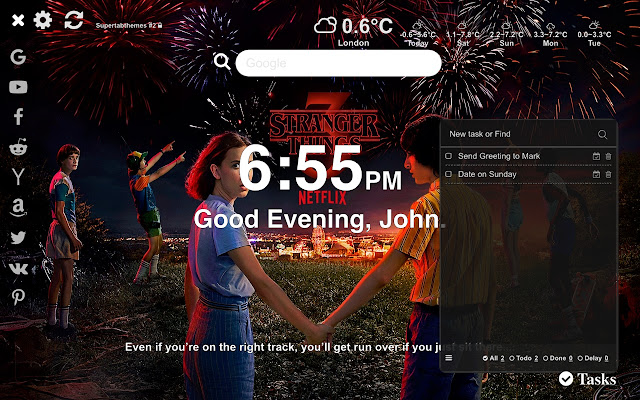
Enjoy the extension we've saved for you. Extension refers to the series that is just coming to us and it's Stranger Things 3 so we've decided while we're waiting for you to enjoy high quality photos and HD resolution. Photos will appear each time you open a new tab in your browser. In addition to quality photos, there are features that will make it easier to use search engines. You can share your experience with friends to get the extension and enjoy the photos
HOW TO USE:
- Install This extension by clicking on Add to Chrome button and it will be automatically added. Wait for few seconds while extension is loaded, the best follows!
- In the upper left corner, "GEAR". That loads settings panel, where you can use toggle button for switching features on or off. Stranger Things 3 extension have options for you to have only HD backgrounds (pick favorite or make it random) or use some of great features.
FEATURES
- Centered, clock (12h/24h option) with personalized greeting for you to choose (ex. nickname)
- Great To-Do list so you can track important stuff
- Shortcuts to popular sites (click on Link icon in upper left corner).
- Quotes of the Day – be inspired with strong quotes, picked every day for you and your motivation.
- Click on Gear icon in upper left corner - Choose to have only wallpaper, or pick feature that you want.
- In same panel, click on Photos, and choose your favorite photo, or click on “Refresh” button next to gear to pick next wallpaper.
With this extension you will get wallpapers, art, drawings of Stranger Things 3 and many more.
UNINSTALL
To remove extension from your browser, follow these steps:
- Find three vertical dots icon on upper right corner of screen - Go to “Settings”.
- In the menu that appears , choose “Extensions”.
- From the list of installed Extensions, find the name of the extension you wish to uninstall.
- Click on the trash can icon to the right of “Enable” (for the extension you wish to uninstall).
- Our extension should be removed from your Chrome browser.
Easier way – right click on icon in toolbar and click “Remove from Chrome…”
Disclaimer notice:
This extension is made by fans, for the fans. We and the content are not affiliated with, sponsored or approved by any company and is unofficial. If you think that we broke your copyright, please contact us. While this extension is free, some part can contain ads.
Extore is a team of professionals who are passionate about creating extensions for web browsers. This devotion also gives us opportunity to appreciate work of other people. We get inspired by useful, open source extensions made by developers all over the world. Our strong belief is that one should share helpful add-ons with others. That’s why we’d like to present you our ever-growing list of favourite extensions that have inspired us. Moreover, as you probably have already learned, sometimes struggling for the best brings an end to the good. Talking about add-ons it often turns out that an upgrade is worse then previous version. Also it can become really tricky to get back to the beloved version of your favourite extension. That’s why we’re going to make not only the latest, but all versions of our favourite (and we hope yours too) add-ons available for download. No more compromises, just stick to the version you really like!
 Preparing download link, please wait for seconds
Almost done...
Click to download
Error getting file. Please try again
Preparing download link, please wait for seconds
Almost done...
Click to download
Error getting file. Please try again







