
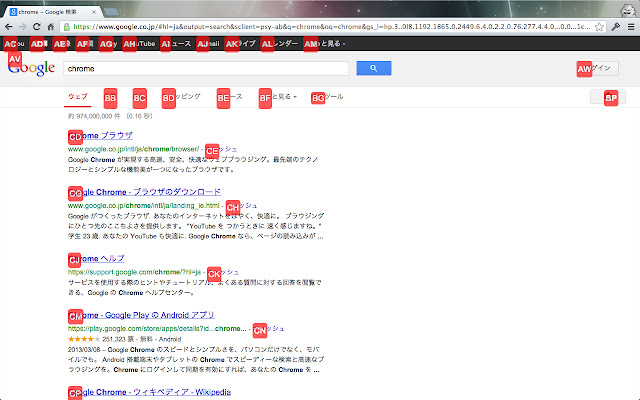
なるべくマウスは使いたくない、キーボードだけでウェブブラウジングしたい、そんな人のための拡張です。これがあれば、リンクのクリックも、タブの選択も、ブックマークや履歴からページを開くこともキーボードだけでできます。
この拡張はHit a hintとtab switchの機能を提供します。
** 使い方
初期設定では
Hit a hintモードスタート (Ctrl+r)
Hit a hint(新規タブで開く)モードスタート (Ctrl+t)
Tab switcherモードスタート (Ctrl+;)
上記モードをキャンセル (ESC)
となっています。
これらはオプションページで変更することができます。
*** Hit a hintモード
Hit a hintモードではリンクにアルファベット2文字のマークがつきます。このアルファベットをタイプするとそのリンクをクリックできます。
*** Tab switcherモード
Tab switcherモードでは現在開いているタブとブックマーク、履歴から作られたリストが表示され、カーソルをあわせてエンターを入力することでそのタブに移動したり、URLを(新しいタブで)開いたりすることができます。
また、Tab switcherモードでは入力した文字でリストを絞り込むことができます。(タイトルかURLに含まれるもののみ抽出されます。またスペース区切りでand検索になります)
***
現在、gmailとgoogle calendarでは動作しないようにしてあります。将来的にはユーザーがオプションページで、除外URLを指定できるようにするつもりです。
*** 更新履歴
0.7.0
timer機能に時刻指定timer追加
0.6.0
timer機能追加
0.5.6
optionページのスタイルを調整
0.5.5
shiftキーも起動キーのモディファイアキーとして使えるようにした
0.5.4
起動キーの設定でaltキーが効いていない問題を修正した
Extore is a team of professionals who are passionate about creating extensions for web browsers. This devotion also gives us opportunity to appreciate work of other people. We get inspired by useful, open source extensions made by developers all over the world. Our strong belief is that one should share helpful add-ons with others. That’s why we’d like to present you our ever-growing list of favourite extensions that have inspired us. Moreover, as you probably have already learned, sometimes struggling for the best brings an end to the good. Talking about add-ons it often turns out that an upgrade is worse then previous version. Also it can become really tricky to get back to the beloved version of your favourite extension. That’s why we’re going to make not only the latest, but all versions of our favourite (and we hope yours too) add-ons available for download. No more compromises, just stick to the version you really like!
 Preparing download link, please wait for seconds
Almost done...
Click to download
Error getting file. Please try again
Preparing download link, please wait for seconds
Almost done...
Click to download
Error getting file. Please try again







