
# Markdown JavaScript Viewer (mdjs-viewer)
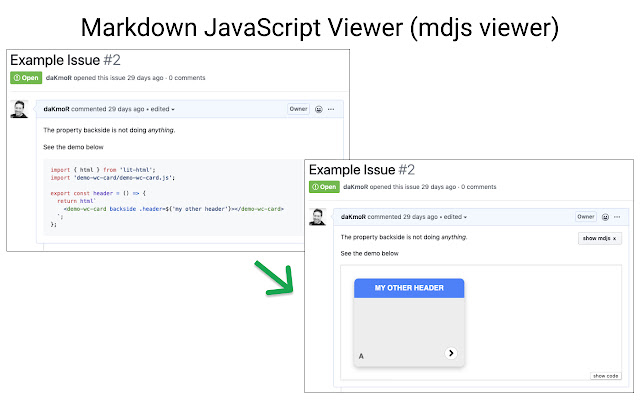
[mdjs (Markdown JavaScript)](https://www.npmjs.com/package/@mdjs/core) allows to execute code and show interactive demos within your markdown documentation.
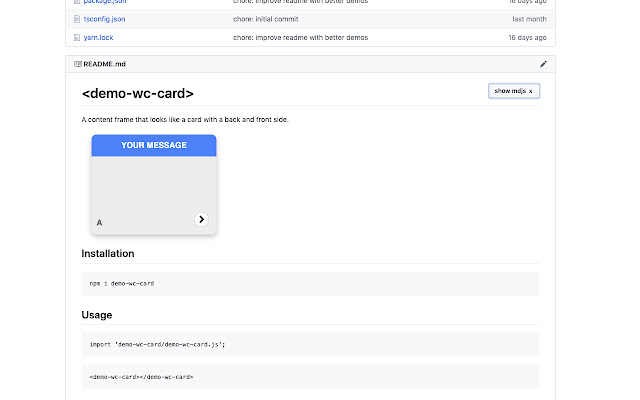
This extension takes this functionality and enables it directly on github.com.
You can see live demos in
- Github Markdown files (like README.md)
- Github Issues (incl. edit preview, new comment preview, new issue preview)
- ... more is planned but not yet implemented
## Security
Executing user code especially in github issues can be dangerous.
This extension isolates code executing as much as possible.
It can be considered as secure as any page that executes user code like codepen or jsfiddle.
The Security Measures are:
- not executing any code without user action (e.g. requires a click of a button first)
- shows demos/executes code within an iframe
- that uses [sandbox](https://www.w3schools.com/tags/att_iframe_sandbox.asp) with the following settings `sandbox="allow-scripts"`
- populates the iframe with a data uri
- does not allow any requests (except unpkg) to got outside of the iframe
This prevents [all known attack vectors](https://github.com/open-wc/mdjs-viewer/issues/2). If you come up with new once please [report them](https://github.com/open-wc/mdjs-viewer/issues/new).
### Warning
In order to function this extension modifies the CSP (Content Security Policy) for github.com with the following rules:
- adds to script-src
- `'unsafe-inline'` to execute code blocks within the mdjs iframe
- `unpkg.com` to load user dependencies from within the mdjs iframe
## Demos
Enable the extension and visit the following pages
1. [Readme of demo-wc-card](https://github.com/daKmoR/demo-wc-card)
2. [Issues of demo-wc-card](https://github.com/daKmoR/demo-wc-card/issues/1)
## How does it work?
It adds a button `show demo ▹` to markdown pages and issues. Once you press it will get the raw md text which then gets pass though [mdjs](https://www.npmjs.com/package/@mdjs/core) and an extra plugin which replaces all imports (relative and bare imports) with [unpkg.com](https://unpkg.com/) urls with the `?module` flag. This way all dependencies can be directly loaded in the browser without the need of any service.
Finally we create an iframe with the content of the mdjs html and js output.
## Limits
In order to get the raw md content of an issues (only the first message not following comments) a request to api.github.com is required.
This request is only needed if you actually click on the `show demo ▹` button.
There is a hard limit of 60 anonymous api calls to github per hour.
For more an API key is needed. (You can not yet provide it to the extension ???? - feel free to open a feature request)
Extore is a team of professionals who are passionate about creating extensions for web browsers. This devotion also gives us opportunity to appreciate work of other people. We get inspired by useful, open source extensions made by developers all over the world. Our strong belief is that one should share helpful add-ons with others. That’s why we’d like to present you our ever-growing list of favourite extensions that have inspired us. Moreover, as you probably have already learned, sometimes struggling for the best brings an end to the good. Talking about add-ons it often turns out that an upgrade is worse then previous version. Also it can become really tricky to get back to the beloved version of your favourite extension. That’s why we’re going to make not only the latest, but all versions of our favourite (and we hope yours too) add-ons available for download. No more compromises, just stick to the version you really like!
 Preparing download link, please wait for seconds
Almost done...
Click to download
Error getting file. Please try again
Preparing download link, please wait for seconds
Almost done...
Click to download
Error getting file. Please try again







