
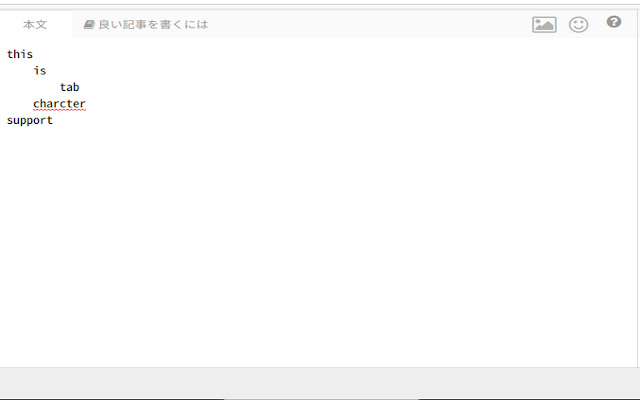
ふつう、テキストエリアはTabキーを押した時に次の要素にフォーカスが移動してしまいます。
この拡張機能は、フォーカスを移動させずにタブ文字を入力することを可能にします。
## 操作方法
1,拡張機能をインストール
2,テキストエリア上で右クリック
3,「このページのテキストエリアでtab文字を入力する」をクリック
これだけで、タブ文字を入力することができるようになります。
## タブ文字を有効にした場合の機能
・タブ文字を入力できるようになる
・Enterで改行時に自動でインデントを挿入
・等幅フォント化
・タブ幅を自由に選択可能(1〜16)
## ユーザーのプライバシーについて
・この拡張機能はユーザーにプライバシー情報の入力を求めることはありません。
・この拡張機能はユーザーのプライバシー情報を取得も保存も送信もしません。
Extore is a team of professionals who are passionate about creating extensions for web browsers. This devotion also gives us opportunity to appreciate work of other people. We get inspired by useful, open source extensions made by developers all over the world. Our strong belief is that one should share helpful add-ons with others. That’s why we’d like to present you our ever-growing list of favourite extensions that have inspired us. Moreover, as you probably have already learned, sometimes struggling for the best brings an end to the good. Talking about add-ons it often turns out that an upgrade is worse then previous version. Also it can become really tricky to get back to the beloved version of your favourite extension. That’s why we’re going to make not only the latest, but all versions of our favourite (and we hope yours too) add-ons available for download. No more compromises, just stick to the version you really like!
 Preparing download link, please wait for seconds
Almost done...
Click to download
Error getting file. Please try again
Preparing download link, please wait for seconds
Almost done...
Click to download
Error getting file. Please try again







