
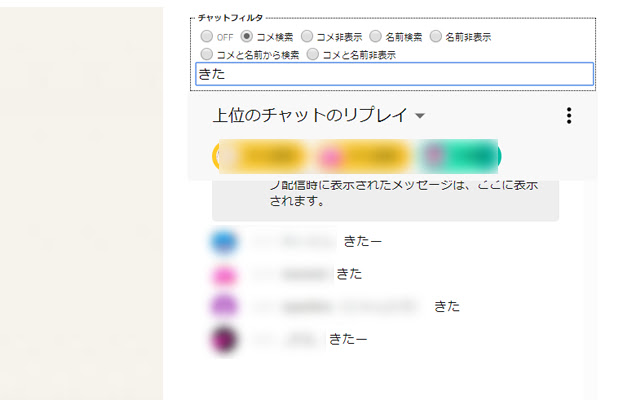
YoutubeLiveのチャット欄に表示されている会話を、条件に合わせてフィルタリングします。
-----------------
*使い方*
①拡張機能追加後、ブラウザ上部に『Y』と
書かれたアイコンが出てくるので、
それをクリックします。『Y』の色が替わります。
『Y』が青色の状態がチャットフィルタの表示がオンの状態です。
YoutubeLiveのチャット欄上部にチャットフィルタの項目が追加されます。
表示されていない場合はページを読み込み直してください。
②チャットフィルタの項目にあるラジオボタンにチェックを入れ
フィルタの種類を選択し、テキストボックスにフィルタしたい
文字列を入力します。フィルタの種類は以下の通りです。
OFF:フィルタリングを行いません。通常のチャットと同じ表示です。
コメ検索:テキストボックスに入れた文字列が入っているコメントのみ表示します。
コメ非表示:テキストボックスに入れた文字列が入っているコメントを非表示にします。
名前検索:テキストボックスに入れた文字列が入っているユーザーのコメントのみ表示します。
名前非表示:テキストボックスに入れた文字列が入っているユーザーのコメントを非表示にします。
コメと名前から検索:テキストボックスに入れた文字列が入っているユーザー名、コメントのみ表示します。
コメと名前非表示:テキストボックスに入れた文字列が入っているユーザー名、コメントを非表示にします。
-----------------
-----------------
*チャットフィルタの項目を非表示にしたい場合*
ブラウザ上部に表示されている『Y』のアイコンをクリックし、
『Y』の文字を灰色にします。その後ページを読み込み直すと、
チャットフィルタの項目がなくなります。
-----------------
-----------------
*寄付歓迎*
BTC:32Qxnu2QHwNGcyfcSffFxD3uuKuqG2Q7vS
XEM:6b173dbf676a7338
-----------------
Extore is a team of professionals who are passionate about creating extensions for web browsers. This devotion also gives us opportunity to appreciate work of other people. We get inspired by useful, open source extensions made by developers all over the world. Our strong belief is that one should share helpful add-ons with others. That’s why we’d like to present you our ever-growing list of favourite extensions that have inspired us. Moreover, as you probably have already learned, sometimes struggling for the best brings an end to the good. Talking about add-ons it often turns out that an upgrade is worse then previous version. Also it can become really tricky to get back to the beloved version of your favourite extension. That’s why we’re going to make not only the latest, but all versions of our favourite (and we hope yours too) add-ons available for download. No more compromises, just stick to the version you really like!
 Preparing download link, please wait for seconds
Almost done...
Click to download
Error getting file. Please try again
Preparing download link, please wait for seconds
Almost done...
Click to download
Error getting file. Please try again







