


version 0.0.32 - Download ZIP file
version 0.0.31 - Download ZIP file
This extension will validate Steemit related websites by changing its icon color:
- red is for blacklisted sites
- green is for recognised friendly sites
- grey is for unrecognised sites
On Steemit.com, the system already marks external links with a grey icon on the right of each links. Steemed Phish will make that icon more obvious by coloring it in purple. On top of that, it will make a bubble appear next to the mouse cursor with a text explaining the fact that clicking on the link with leads you away so don't use your password.
Steemed Phis uses:
- a whitelist
- a blacklist
- a link detection from the current page
Blacklist and whitelist are hard to maintain but adding them help widening the coverage.
Changelog:
## v0.0.32
- code cleanup and optimisation
- fix issue with some links not being scanned properly
## v0.0.31
- make comment blocks more visible as a work around the new strategy described by witness @arcange
- add support for steemcleaners steemit account blacklist and mark those authors if found on any steemit blogs
- when hovering the mouse on an image, show a dotted border to help spot fake upvote/reply links
## v0.0.30
- added steemcleaners blacklist
## v0.0.29
- minor fixes on how the blacklist is loaded
- more sites added to the blacklist
## v0.0.28
- improve full page alert within iframes when no body tag is found
- improve URL unshortening script
## v0.0.27
- improve detection of phishing sites within iframes
## v0.0.27
- detects phishing sites within iframes
## v0.0.26
- fix whitelist bug
- adding cache buster to siteList.json URL
## v0.0.25
- updated the popup screen
- use of regexp for blacklist and whitelist
## v0.0.24
- added own URL expander that works better with services such as https://t.co
## v0.0.23
- better way to handle blacklist and whitelist
- update the popup
## v0.0.22
- blacklist update
## v0.0.21
- added regexp for suspicious non blacklisted sites. Trying to find a pattern hostname (IP address for example) used by scammers and show an alert if found.
- blacklist update
## v0.0.20
- not showing the external link warning on friendly websites
## v0.0.19
- blacklist update
- unshorten URL from links and check them against black lists
## v0.0.17 & v0.0.18
- bug fix
## v0.0.16
- the external link marker is now purple instead of read to not be confused with a scam link that is also red
- faster scan of anchors
- use a tooltip that moves with the mouse to make external links more visible
## v0.0.15
- added whitelist site
- change icon (Made by http://www.freepik.com from https://www.flaticon.com/, is licensed by Creative Commons BY 3.0 http://creativecommons.org/licenses/by/3.0/ )
## v0.0.14:
- click on the extension icon to see instructions on how to send me new sites to be whitelisted or blacklisted
## v0.0.13
- better fix for flickering of page when injecting custom css
## v0.0.12
- added new blacklisted domain
- share blacklist between the background and content scripts
## v0.0.11
- improve blacklisted links detection by using the MutationObserver API. This allows marking of links from hidden comments due to low ratings.
- fix flickering issue when injecting css
## v0.0.10
- bug fix
## v0.0.9
- bug fix
## v0.0.8
- added more whitelisted sites
- one extra color for the extension icon: red = blacklisted site, green = known good steemit related site, grey = not a known steemit related site
- the alert on a click on an external link has been removed and replaced by the behaviour below
- steemit.com has added a little grey icon next to a link that takes you away from it, this icon is now made red instead of grey for better visibility
- if an external link is from a blacklisted site, the link will highlighted in red and stricken through and marked as SCAM
- a link back to the equivalent page on Steemit is added to the full page alert
## v0.0.7
- added a popup screen when you click on the extension icon info on how to contact me for reporting new scams
- fixed the full page red warning panel to display for steewit.com
## v0.0.6
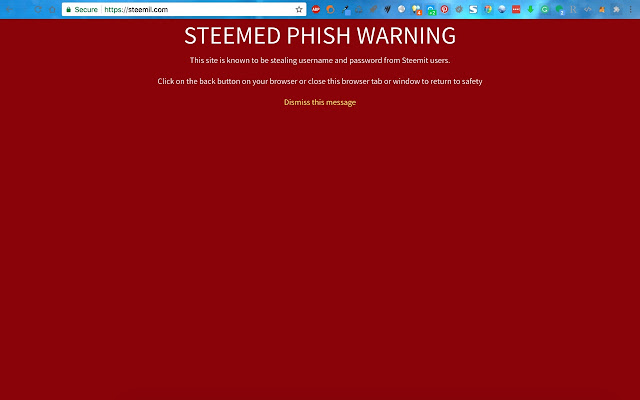
- A content script is also injected into blacklisted websites and covers the age with a red warning panel. This does not work for all sites such as steewit.com.
## v0.0.5
- The content script is injected into the page of whitelisted websites. When a user clicks on a link that takes him/her away from the current website, an alert dialog will show up to raise awareness.
- The background script monitor browser tabs and their URL and update the extension icon color accordingly. A green icon means the current website was found in the whitelist else it will be red.
- When a user opens a blacklisted website an alert will show up to raise awareness
Extore is a team of professionals who are passionate about creating extensions for web browsers. This devotion also gives us opportunity to appreciate work of other people. We get inspired by useful, open source extensions made by developers all over the world. Our strong belief is that one should share helpful add-ons with others. That’s why we’d like to present you our ever-growing list of favourite extensions that have inspired us. Moreover, as you probably have already learned, sometimes struggling for the best brings an end to the good. Talking about add-ons it often turns out that an upgrade is worse then previous version. Also it can become really tricky to get back to the beloved version of your favourite extension. That’s why we’re going to make not only the latest, but all versions of our favourite (and we hope yours too) add-ons available for download. No more compromises, just stick to the version you really like!
 Preparing download link, please wait for seconds
Almost done...
Click to download
Error getting file. Please try again
Preparing download link, please wait for seconds
Almost done...
Click to download
Error getting file. Please try again







