

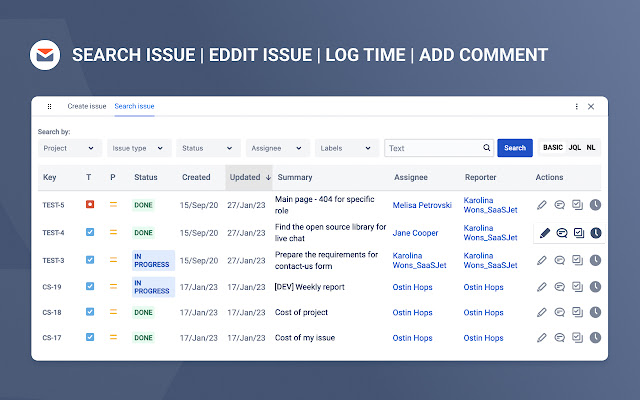


Jira & Chrome Extension: Manage Issues Effortlessly Without Switching to Jira
With this Chrome extension for Jira, you can connect your browser to the Jira instance and fully manage your issues directly from any tab. That way you get less distracted while working in a multitasking environment. Every Jira ticket is created in seconds. The Jira in Chrome extension also arranges a quick and easy way to track the status of Jira issues, view linked attachments and comments, and add comments and updates directly from any tab of your browser.
Jira Quick Management
Jira in Chrome extension provides you with full basic functionality to organise your everyday work with Jira issues. So, you can easily:
Generate a task or subtask from any webpage or directly from your Gmail
Search for any issue you have in your Jira projects
Edit each Jira issue with ease if you need to make quick changes
Add comments to tickets to improve your team communication
Log your work time effortlessly whenever you need
You can perform most of the options above by using specially designed hot buttons. Regarding issues search, you can do it with predefined alternatives such as: Search by project, Search by issue type, Search by status, Search by assignee, Search by label, and Search by text. Or utilize Jira Query Language (JQL) to create your special request and find tickets.
Also, this Chrome extension allows you to detect issues and issue types in every email. As a result, you get one extra Gmail to Jira ability to optimize your workflow and prioritize important assignments.
Installation
Installation Jira in Chrome extension is easy and only takes three steps:
After you have pressed the “Add to Chrome” button, the application icon will appear in your extensions. To link your Jira account, click the icon and select Login.
Enter your Jira account's email address and site name.
Generate an API token in Jira to be used with the extension.
That's all. Now, you can quickly manage personal tasks, as well as team and subordinates Jira tickets. If you need any assistance or want to ask questions, please email us at [email protected]
The suite of Jira in Chrome applications
To get even more possibilities of extension functionality, you can download the app from the Atlassian Marketplace. Here is a 30-day trial to check if the app is good for you.
Atlassian Marketplace:
https://marketplace.atlassian.com/apps/1228960/email-tasks-jira-cloud-for-gmail?hosting=cloud&tab=overview
Additionaly, install the connector application for your Gmail.
Google Workspace Marketplace:
https://workspace.google.com/marketplace/app/emailtasks_jira_cloud_for_gmail/561276457140
*Email&Tasks: Jira Cloud for Gmail™ app is a plugin that integrates the Jira Cloud project management with the Gmail email platform. The app adds a button to Gmail's interface, allowing users to quickly convert emails into Jira tasks, view and update Jira task information within their email, and stay updated on task progress without leaving their Gmail interface. This integration helps streamline workflows and increase productivity by providing a seamless connection between email communication and project management.
By integrating Gmail to Jira cloud, you will be able to transform any email to Jira issues. The Email&Tasks application package is based on AI and machine learning and aims to simplify your everyday work and increase your efficiency.
Try to convert your assignment from Gmail to Jira issue / ticket without extra efforts.
*Work with application suite is absolutely safe and confidential.
Extore is a team of professionals who are passionate about creating extensions for web browsers. This devotion also gives us opportunity to appreciate work of other people. We get inspired by useful, open source extensions made by developers all over the world. Our strong belief is that one should share helpful add-ons with others. That’s why we’d like to present you our ever-growing list of favourite extensions that have inspired us. Moreover, as you probably have already learned, sometimes struggling for the best brings an end to the good. Talking about add-ons it often turns out that an upgrade is worse then previous version. Also it can become really tricky to get back to the beloved version of your favourite extension. That’s why we’re going to make not only the latest, but all versions of our favourite (and we hope yours too) add-ons available for download. No more compromises, just stick to the version you really like!
 Preparing download link, please wait for seconds
Almost done...
Click to download
Error getting file. Please try again
Preparing download link, please wait for seconds
Almost done...
Click to download
Error getting file. Please try again







