

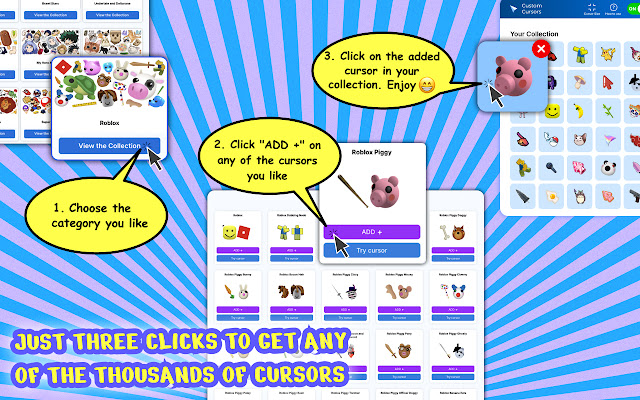

Custom Cursor Changer is a great extension for Chrome that lets you change your browsing experience by creating your own mouse pointers. With the massive library of this extension, you can find anything to suit your style, whether it's a set of alien symbols or something else entirely. Change your cursor now and get ready for an awesome experience!
Use a lot of cursor collection on webpages and websites:
- 3d
- aesthetic
- animal
- animated
- anime
- bear
- bigger
- black cat
- bleach
- cake
- cartoon
- cat
- celebrity
- cherry blossom
- cookie
- cool
- cute
- decorative
- deviantart
- different
- digimon
- dim
- flower
- funny
- game
- gaming
- girly
- gucci
- hatsune
- heart
- love
- marshmello
- marvel
- master sword
- minimalist
- mousecape
- navi
- night diamond
- pewdiepie
- pink
- plant
- pokemon
- roblox
- sailor moon
- space
- star
- supreme
- sushi
- tiny
- tokyo ghoul
- white chroma
Nowadays, all Chrome users can customize their cursor. So, if you are not satisfied with the default cursor and want to bring a custom one, you’ve come to the right place.
We will show you how to get it for Chrome on Computer, Chromebook, Windows 10, Mac, etc. Go through the post to know about it.
Step 1: First of all, open up Chrome and go to the Custom Cursor Changer for Chrome website. Now add the extension by clicking on Add to Chrome button.
Step 2: Once installed, click on Add New button from the pop-up window that appears.
Step 3: Next, click on Select Image button from the window that comes up after clicking on Add.
Step 4: Now select an image from collection.
Make Chrome your own. Personalize your Chrome browsing experience.
If you're looking for a way to customize the mouse cursor in Chrome, you came to the right place. With Custom Cursors for Chrome you can customize your own mouse cursors with just a few clicks.
There are over 1,000 custom cursors ready to be used on any website. The extension allows you to use customized cursors on any web page. The changes are made in real time so that you can see what they look like before deciding if they work or not.
Whether you're looking for cursors that look like an anime character, a cat, dog, or something else, Custom Cursors for Chrome has it all. There are even custom cursors for holidays and special occasions!
Custom Cursors for Chrome is the perfect tool for people who want to change their mouse cursor but don't want to do it manually. If you want to be able to use a different cursor on every website that you visit, this extension is perfect for you!
Extore is a team of professionals who are passionate about creating extensions for web browsers. This devotion also gives us opportunity to appreciate work of other people. We get inspired by useful, open source extensions made by developers all over the world. Our strong belief is that one should share helpful add-ons with others. That’s why we’d like to present you our ever-growing list of favourite extensions that have inspired us. Moreover, as you probably have already learned, sometimes struggling for the best brings an end to the good. Talking about add-ons it often turns out that an upgrade is worse then previous version. Also it can become really tricky to get back to the beloved version of your favourite extension. That’s why we’re going to make not only the latest, but all versions of our favourite (and we hope yours too) add-ons available for download. No more compromises, just stick to the version you really like!
 Preparing download link, please wait for seconds
Almost done...
Click to download
Error getting file. Please try again
Preparing download link, please wait for seconds
Almost done...
Click to download
Error getting file. Please try again







